A Montana State Map must stretch across a broad east–west frame while keeping 56 county shapes readable. Montana reaches from the Idaho border and the northern Rocky Mountains to the plains adjoining North Dakota and South Dakota, with Wyoming below and Canada above. That width is why the supplied maps use a landscape composition rather than forcing the state into a narrow portrait page.
The collection provides three views of the same county framework: a pastel color reference, a black-and-white labeled version, and an unlabeled outline. The published previews are 1,200 × 849-pixel WebP images, and the protected ZIP is described in the source package as containing printable JPG and PNG resources prepared around an A3 layout. Teachers, students, presenters, writers, and designers can therefore choose between immediate identification and a clean base for their own work.
These are county-boundary maps, not road, city, terrain, or national-park maps. They do not plot Helena, Billings, highways, rivers, elevations, or reservation boundaries. Their value lies in showing how the large western counties, narrower north-central divisions, and broad eastern counties fit together. Reading that scope correctly prevents a user from expecting details that the artwork does not contain.
Table of Contents
Montana State Map Overview
The Montana State Map divides the state into all 56 counties. The U.S. Census Bureau reports 145,550.36 square miles of land area for Montana in 2020, so even a county-only sheet has to cover considerable geographic extent. The map handles that scale by placing the western mountain-front counties and the eastern plains counties on one uninterrupted horizontal field.
- Administrative level: county boundaries
- County total: 56
- Supplied views: color labeled, monochrome labeled, and blank outline
- Preview dimensions: 1,200 × 849 pixels
- Page orientation: landscape
The county pattern changes visibly across the page. Lincoln and Flathead occupy the northwest, while Ravalli, Beaverhead, and Madison run through the southwest. Fergus sits near the broad center, with Petroleum and Golden Valley among the smaller interior shapes. Farther east, Phillips, Valley, Garfield, Custer, and Powder River occupy large portions of the plains. Sheridan reaches the northeast corner, Carter the southeast, and Wibaux forms a narrow county on the eastern edge.
A few labels deserve careful reading. “Broad water” is wrapped onto two lines but refers to Broadwater County. “Lewis and clark” should be read as Lewis and Clark County; the lower-case “c” is an artwork capitalization error. Deer Lodge and Silver Bow are rotated or tightly placed because their county shapes leave limited horizontal room. The supplied maps label Canada, Idaho, and Wyoming around the frame, but they do not name North Dakota or South Dakota along the east.
Those observations make the sheet useful as a county locator, but not as an unquestioned spelling or neighboring-state reference. If a project requires authoritative boundary measurements or current administrative data, verify it independently before adding statistics. The artwork is best treated as a readable visual base.
Color Montana State Map for Regional Comparison
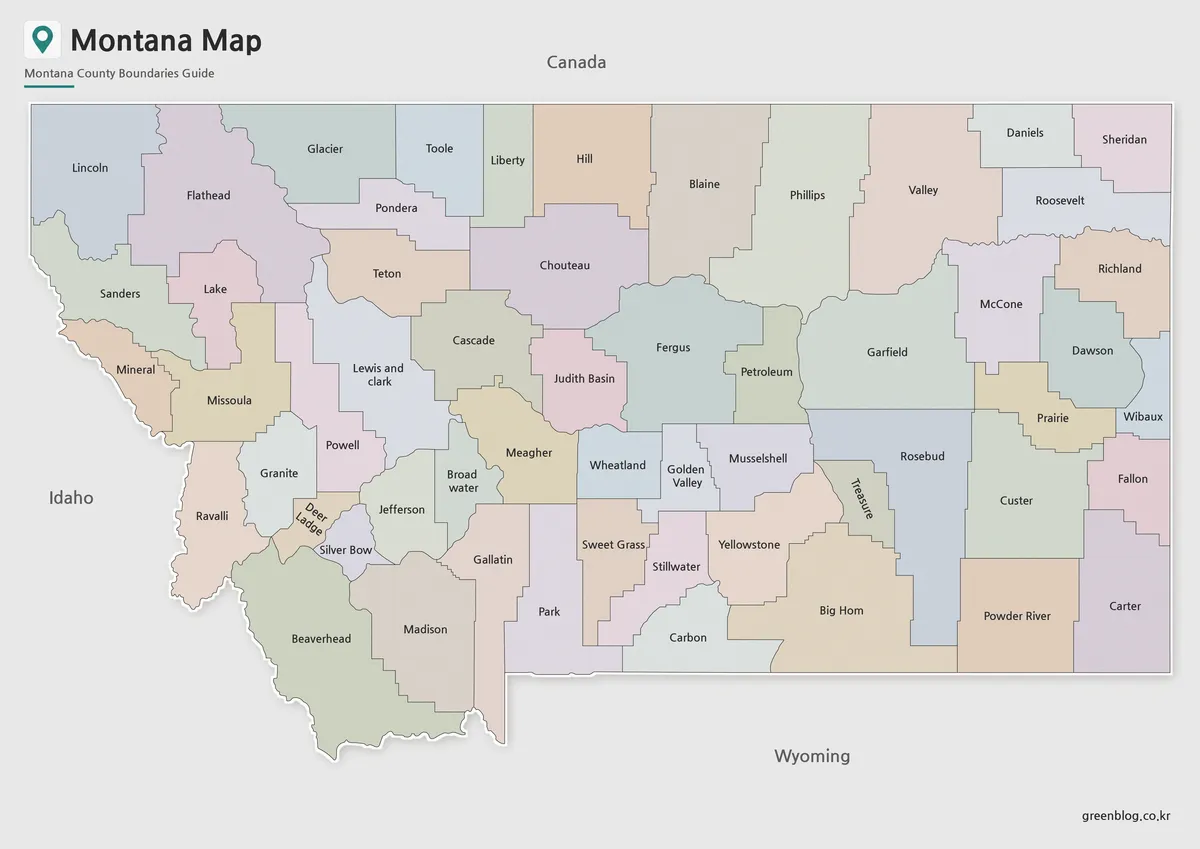
The color Montana State Map is the fastest version for comparing adjacent counties. A restrained pastel palette separates neighboring areas while dark boundary lines and labels remain visible. This matters in the central band, where Meagher, Wheatland, Golden Valley, Musselshell, and Treasure meet in relatively compact shapes compared with the large counties farther east.
Use this view when an audience must identify counties quickly from a screen, poster, or presentation slide. It also works as an answer key for a classroom activity based on the blank map. The colors are categorical rather than thematic: they do not represent population, elevation, land cover, politics, or any measured variable. A legend should only be added after the user assigns a documented meaning to new colors.
For slide design, preserve the full state frame and avoid cropping the narrow western and eastern counties. Downscaling too aggressively can make names such as Petroleum, Wibaux, Treasure, and Golden Valley difficult to read. When space is limited, place the complete map on one slide and enlarge a selected region on a second slide instead of cutting counties from the reference view.
Basic Montana State Map for Printing
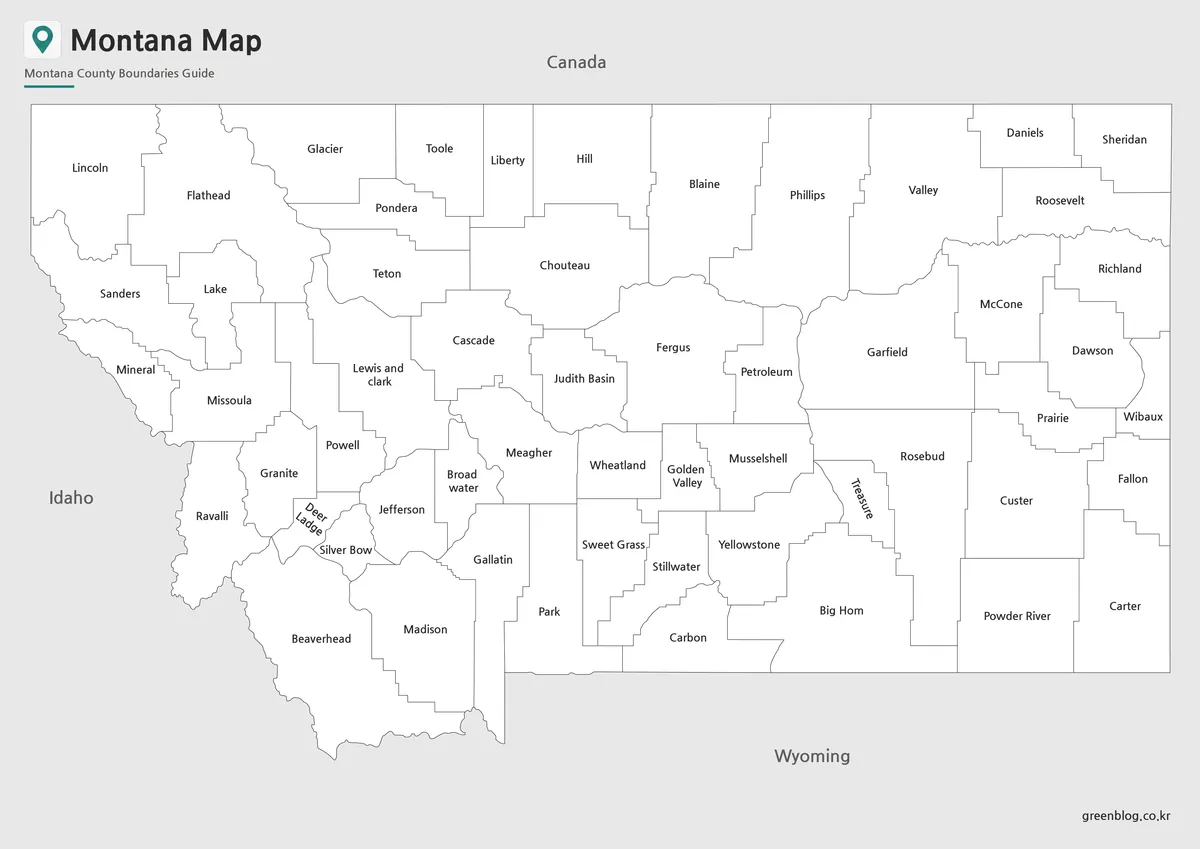
The labeled monochrome view removes the pastel fills but preserves the same 56 boundaries and names. It is a practical choice for toner-conscious handouts, report appendices, study sheets, and worksheets that need room for pencil marks. White county interiors make it easier to circle a location, shade a region, or add a short code without competing with background color.
This version is also better when the map will sit beside a table or chart whose own colors already carry meaning. A colored county reference could accidentally imply a relationship with the chart, whereas a neutral base keeps the two visual systems separate. For accessibility, do not depend on shading alone; add text, symbols, or a keyed pattern when marking selected counties.
Print a test page before producing a class set. The 1,200 × 849 preview has enough detail for ordinary reference, but the smallest labels benefit from the larger A3 layout identified in the source material. Keep the image’s aspect ratio locked, use landscape orientation, and avoid “fit to page” settings that stretch the state unevenly.
Blank Montana Outline Map for Editing
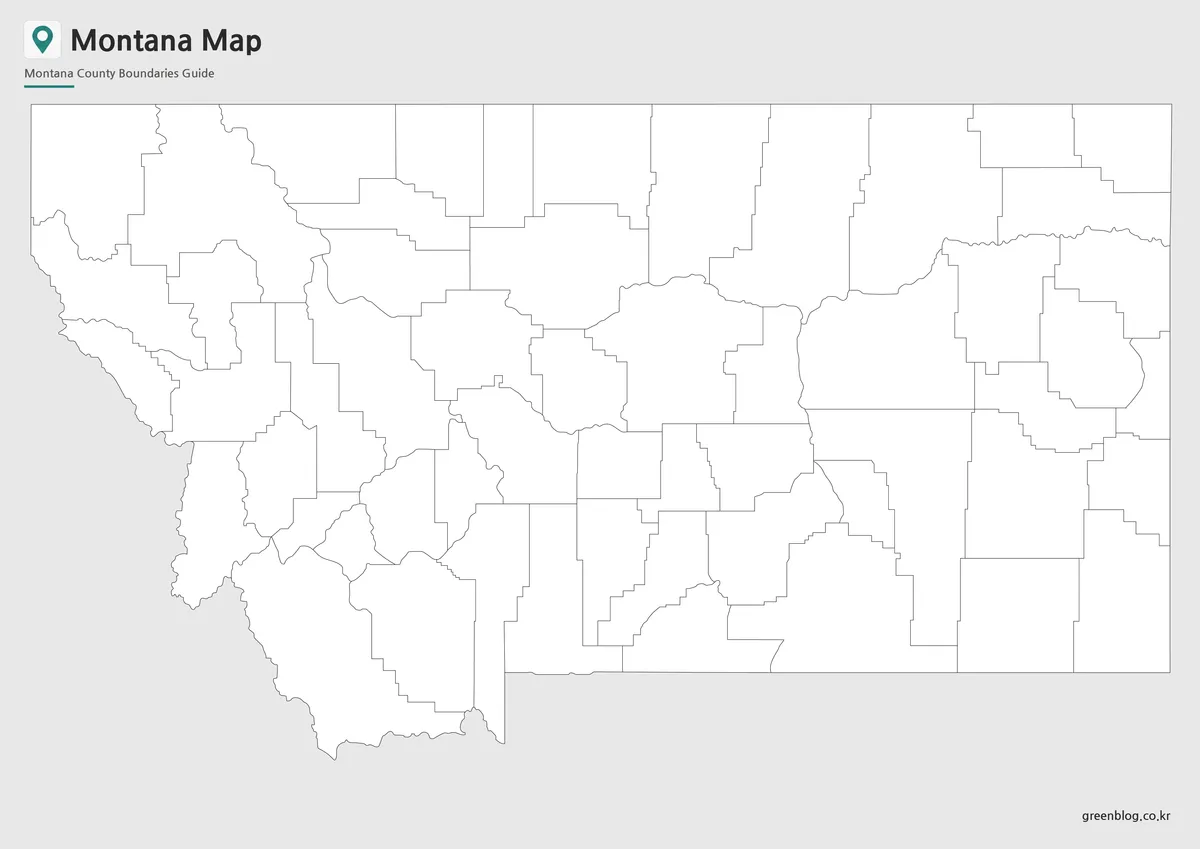
The outline map removes both labels and color while retaining every county division. That makes it the most open-ended of the three supplied resources. Students can identify counties from memory, teachers can create numbered quizzes, and designers can build an original thematic graphic without first erasing existing text.
A useful workflow is to keep an untouched copy as the base layer, duplicate it, and then add information on a separate layer. County fills, labels, routes, icons, and notes can be revised without damaging the boundary image. Because the supplied preview is raster artwork rather than a confirmed vector file, enlarging it far beyond its intended page size will not create additional line detail.
The blank view should not be presented as evidence for a statistic by itself. Add a source, date, legend, and unit whenever counties are colored by population, land area, election result, rainfall, or another variable. The boundaries provide the spatial framework; the user remains responsible for the accuracy and timing of any overlay.
When a Montana State Map Is Useful
A Montana State Map works best when the task begins with county location or county comparison. For a geography lesson, the color map can introduce the pattern, the monochrome map can serve as a reference sheet, and the outline can become the exercise. Using the same geometry across all three versions lets students move between them without learning a new layout.
- Reference: choose the color version for the fastest separation of adjoining counties.
- Low-ink printing: choose the monochrome labeled version for handouts and reports.
- Recall or customization: choose the blank outline for quizzes, categories, and annotations.
- Detailed travel planning: use a road or topographic map instead, because routes and relief are absent here.
For regional comparison, the landscape sheet clearly shows Montana’s long border with Canada and its position above Wyoming. However, the missing east-side neighbor labels mean a presenter should add North Dakota and South Dakota manually if those relationships matter. Likewise, a project about reservations, rivers, mountains, highways, county seats, or cities needs another verified layer rather than an unsupported marker placed by estimation.
Before publication, check that every custom label remains inside its intended county and that the legend describes only the data actually shown. Keep a labeled reference beside the blank version while editing; similar interior shapes can be confused once the names disappear.
Frequently Asked Questions
What is included in this Montana State Map collection?
The collection includes a color map, a basic labeled map, and a blank outline map of Montana.
Is this Montana State Map suitable for A3 printing?
Yes. The map was prepared around an A3 high-resolution layout, making it suitable for classroom handouts, reports, and presentation materials.
Which version is best for editing?
The blank outline map is the best choice for editing. It gives users a clean base for adding colors, labels, routes, markers, or data.
Why is the Montana map shown in a horizontal layout?
Montana extends widely from east to west, so a horizontal layout shows the state shape more naturally than a vertical format.
Can I use the map for travel content?
Yes. The map works well for travel articles, national park references, road trip planning, and regional explanation pages.
Map File Information
Montana County Map Files
- Included Files: Original high-resolution map files shown in this article
- File Type: Image files packaged in a ZIP archive
- Intended Use: Printing, education, presentations, and map-based projects
Related Maps
Additional Resources
- Montana.gov — Use the state government portal to find current Montana agencies, services, and public information.
Green Map creates custom-edited map images using open geographic data sources such as geoBoundaries, Natural Earth, OpenStreetMap, and government open data. These maps are edited visual materials, not raw data files, and are provided for education, documents, presentations, and graphic reference.