This Alaska Map has to fit three very different geographic forms into one frame: the enormous mainland, the Aleutian chain extending far to the southwest, and the narrow island-rich Southeast panhandle. A small national inset often compresses those features, but this dedicated view preserves enough space to show the state’s county-equivalent boundaries and the complicated coast.
Alaska does not use counties. Its current county-equivalent structure consists of 19 boroughs and 11 U.S. Census Bureau-designated census areas, for 30 geographic units based on the 2020 census designations. Boroughs are organized local governments, while census areas divide the territory outside organized boroughs for statistical reporting. The supplied maps shorten the labels by omitting terms such as “Borough,” “Municipality,” and “Census Area.”
The collection contains a pastel labeled reference, a labeled black-and-white version, and an unlabeled boundary sheet. All three Alaska Map previews measure 1200 × 1104 pixels and are provided here as WebP images. They use identical geometry, allowing a reader to compare a completed reference with a blank activity without changing the placement of the mainland, islands, or Southeast divisions.
Table of Contents
Alaska Map Overview
The northern mainland is dominated visually by North Slope Borough, with Northwest Arctic Borough below it. Nome, Kusilvak, and Bethel form a western sequence toward the Bering Sea. In the interior, Yukon-Koyukuk Census Area covers the largest shape on the page, surrounding the much smaller Fairbanks North Star Borough and meeting Southeast Fairbanks Census Area, Denali Borough, and other central regions.
Southcentral Alaska requires closer reading. Matanuska-Susitna Borough sits north of Anchorage Municipality, while Kenai Peninsula Borough extends around Cook Inlet and Chugach Census Area follows the coast to the east. Copper River Census Area lies inland, and Yakutat begins the transition toward the Southeast panhandle. The map uses boundaries and names but does not add city points, roads, rivers, terrain, or a scale.
The southwest combines mainland peninsulas and separated islands. Dillingham and Bristol Bay lie above Lake and Peninsula, Kodiak Island appears offshore, and Aleutians East and Aleutians West extend along the chain toward the lower-left edge. Because the long island arc is drawn within the same frame rather than moved into a separate inset, its distance from southcentral Alaska remains easier to understand.
Southeast Alaska is the most label-dense part of the map. Leader lines identify Haines, Skagway, Juneau, Hoonah-Angoon, Sitka, Petersburg, Wrangell, Prince of Wales-Hyder, and Ketchikan Gateway among channels and islands. The coastline is simplified for a one-page administrative reference, but its fragmented character remains a major visual contrast with the broad northern mainland.
Three names contain visible errors in the supplied artwork: “Kendi Peninsula” should be Kenai Peninsula, “Kodial Island” should be Kodiak Island, and “Peterburg” should be Petersburg. These spellings appear in both labeled previews and should be corrected in any accompanying text or custom overlay. The map subtitle also says “county boundaries,” a familiar search phrase, although boroughs and census areas are the accurate Alaska terms.
Included Printable Map Versions
The labeled versions of this Alaska Map carry the same 30 shortened administrative names. Both also label the Beaufort Sea, Chukchi Sea, Bering Sea, and Gulf of Alaska. The outline removes all geographic and administrative labels, but it retains the state title, the “county boundaries guide” subtitle, the internal lines, surrounding land, and the site mark.
- Color reference: pastel administrative fills, blue water, shortened unit names, and sea labels.
- Monochrome reference: the same boundaries and names on white interiors, with external land shaded gray.
- Blank boundary view: administrative lines and coastlines without unit or water names.
None of the colors represent population, land ownership, climate, or administrative type, and the maps provide no legend for quantitative interpretation. Users who need a thematic map should start with the outline, add their own verified values, and create a separate legend that explains the categories and reference date.
Color Alaska Map for Regional Comparison
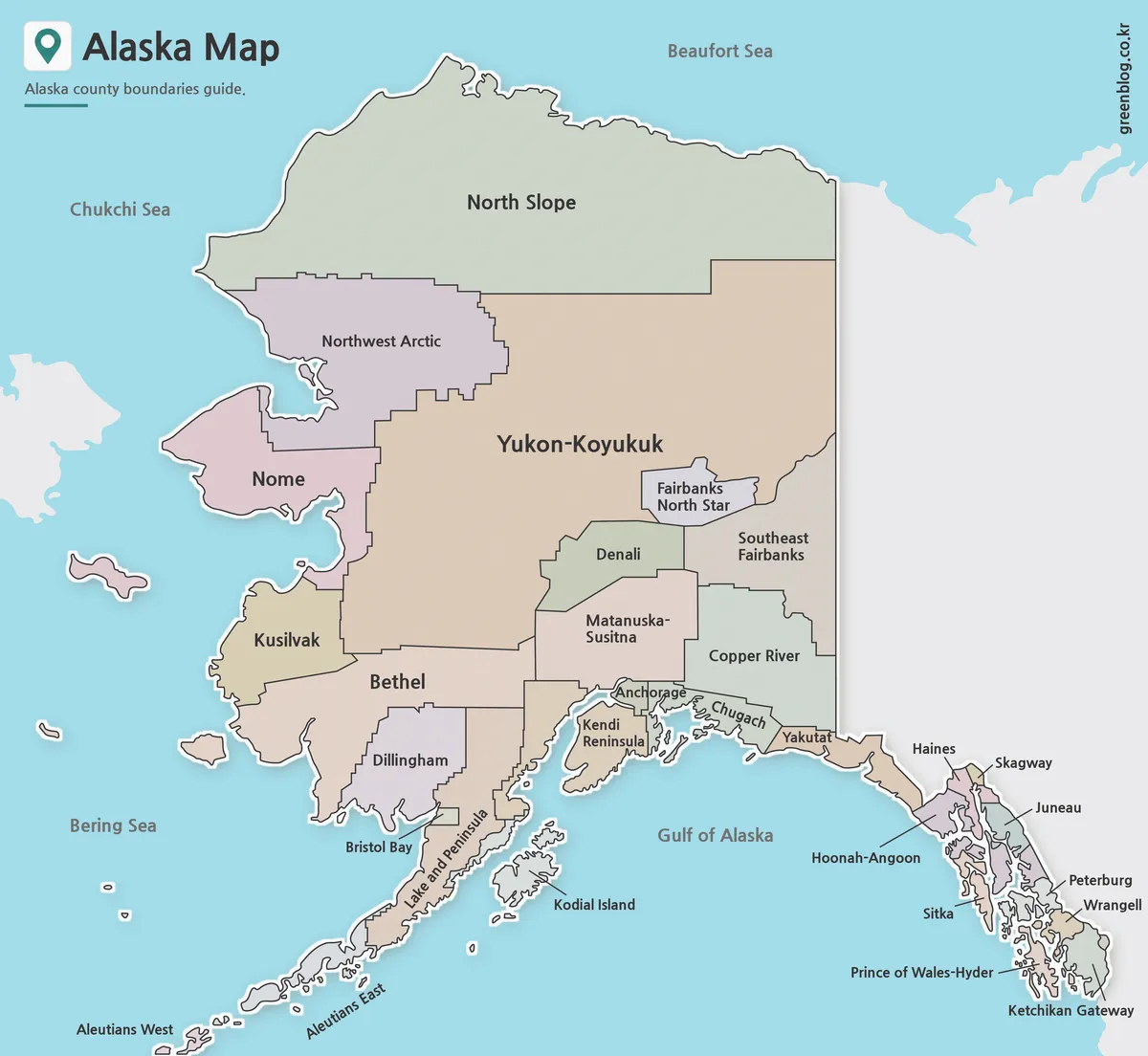
Pastel fills make adjacent units easier to follow across regions with radically different sizes. They separate North Slope from Northwest Arctic, reveal the compact Fairbanks North Star shape within the interior, and clarify the close boundaries around Anchorage, Kenai Peninsula, Matanuska-Susitna, and Chugach. Blue water also helps the Aleutian islands and Southeast channels remain distinct from nearby land.
This is the best version for an introductory slide or a visual comparison exercise. A presenter can first explain the difference between boroughs and census areas, then use the fills to follow a route from the Arctic coast through the interior to the Gulf of Alaska. Because the palette has no legend, it should not be described as grouping units by legal status.
At smaller display sizes, the Southeast leader lines and labels require the closest inspection. Avoid cropping the right edge, where several names extend outside the narrow panhandle, and preserve the lower-left margin for Aleutians West. The frame also includes gray land beyond Alaska but does not identify Canada or Russia by name.
Black and White Alaska Map for Printing
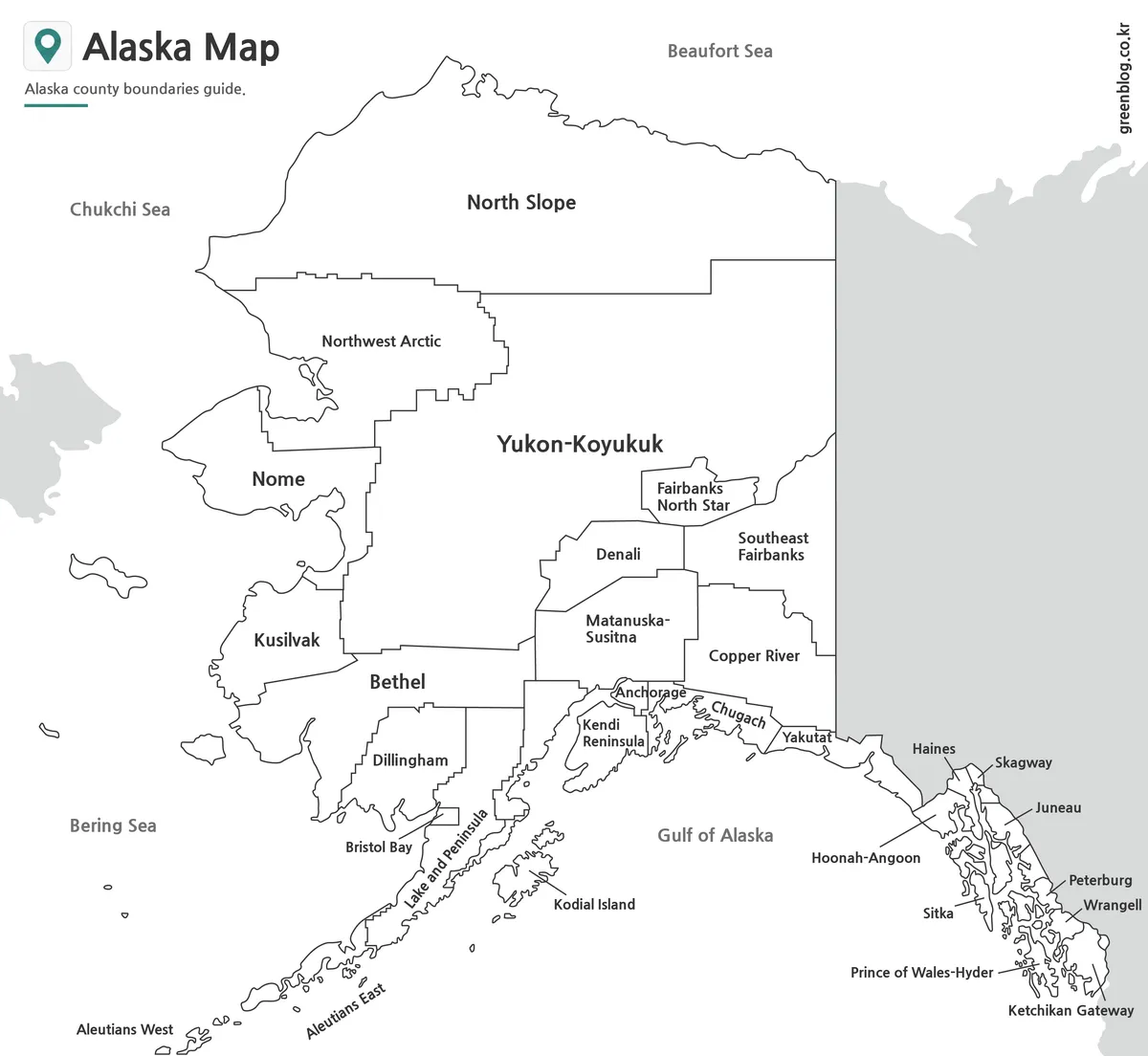
The monochrome view keeps every administrative and water label while changing Alaska’s interiors to white. It works well in a report or answer key where readers need names but do not need decorative separation. Boundary thickness becomes the main visual cue, so the compact southcentral and Southeast units deserve a test print before the map is reduced for a worksheet.
Sea labels remain visible even though the water is white. External land is gray, helping distinguish the international surroundings without naming them. The long Aleutian chain and the many Southeast islands create more fine detail than the broad mainland divisions, so toner-saving settings can remove useful coastlines before they affect the large interior boundaries.
This version is useful for a completed reference beside an outline exercise. It also leaves open county-equivalent interiors for light hatching, numbering, or short notes. When standard names matter, add corrections for Kenai Peninsula, Kodiak Island, and Petersburg rather than copying the three misspelled labels into a report.
Blank Alaska Outline Map for Editing
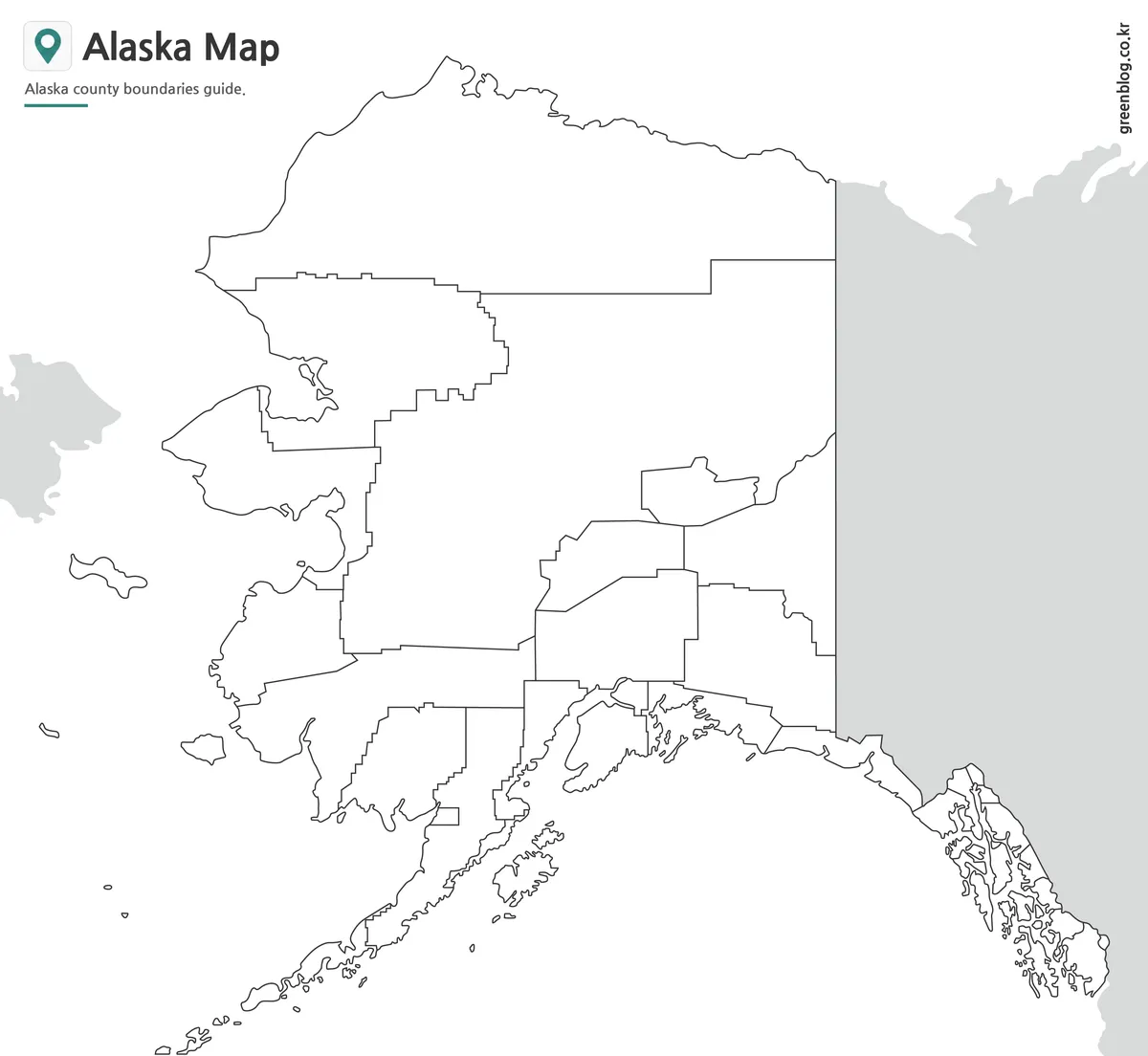
The blank Alaska Map removes the 30 unit names, water labels, and Southeast leader lines. It preserves the full administrative pattern, island outlines, gray external land, title, subtitle, and site mark. This makes it suitable for labeling and shading, but it is not a completely bare state outline or a transparent-background asset.
A structured activity can begin with the five broad zones: Arctic north, western coast, interior, southcentral and southwest, and Southeast. Learners can then place the large units before working through Anchorage and the narrow panhandle divisions. Labeling the Aleutians last prevents their long island chain from pulling attention away from the mainland pattern too early.
The supplied file is a raster image rather than a confirmed vector or layered source. Typed labels, transparent colors, arrows, and symbols can still be added in common editing and presentation software. Any thematic overlay should state what the new colors mean, because the outline contains boundaries only and does not carry population, travel, environmental, or economic data.
Practical Uses for the Alaska Map
A dedicated state view helps explain why Alaska cannot be read like a compact county map. The giant Yukon-Koyukuk area, the scattered Aleutians, and the narrow Southeast divisions occupy very different visual scales. Teachers can use those contrasts to introduce county equivalents, while presentation creators can use the same geometry to move from a labeled overview to a custom highlighted region.
The maps also support borough and census-area identification, north-to-south regional comparisons, and simple location graphics. They are not suited to route planning because they omit roads, settlements, ferry connections, airports, and distance information. Anchorage, Juneau, Sitka, and other familiar names appear as administrative units, not as point symbols showing urban centers.
For print or slide placement, keep the 1200:1104 aspect ratio and leave clear margins on both sides. The Aleutians approach the lower-left edge, while Southeast labels reach the right edge in the labeled versions. Cropping either side would remove precisely the areas that make Alaska’s geography different from a mainland-only outline.
Choosing the Right Version
Use the color Alaska Map when a viewer needs immediate separation between neighboring units and surrounding water. Choose the monochrome reference when names matter more than color or when the page will be printed economically. Select the outline when learners or designers should supply labels, categories, or emphasis themselves.
Whichever version is used, explain that the divisions are county equivalents rather than counties. For a polished publication, standardize the three misspelled names in accompanying text and confirm detailed boundaries against a current government reference. This keeps the map’s useful one-page structure while avoiding claims that the artwork itself is a legal survey.
FAQ
Is this Alaska map printable?
Yes. The map files are prepared for high-resolution printing and can be used for classroom materials, reports, and presentation handouts.
Does the Alaska map include borough boundaries?
Yes. The collection includes versions that show Alaska’s regional and borough-style administrative boundaries.
Can I use the outline map for editing?
Yes. The outline version is designed for editing, coloring, annotation, and custom graphic work.
Which version is best for classroom use?
The black and white map is usually best for worksheets, while the color map works better for visual explanation and slides.
Is the Alaska map useful for presentations?
Yes. The color and labeled versions are suitable for presentation slides, regional comparison, and educational visuals.
Does the Alaska Map show counties? It shows Alaska’s 30 county equivalents: 19 boroughs and 11 census areas. The artwork shortens their labels and uses “county boundaries” in its subtitle, but Alaska has no counties in the usual legal sense.
Map File Information
The archive contains the three Alaska administrative views displayed above for reference, labeling, presentations, and custom graphics.
- Included Versions: Color labeled, black-and-white labeled, and blank outline maps
- File Type: Image files in a ZIP archive
- Intended Use: Lessons, answer keys, reports, slides, and annotations
Related Maps
Additional Resources
The State of Alaska’s geographic descriptions page explains the 19 boroughs and 11 census areas and lists their standard names.
Green Map creates custom-edited map images using open geographic data sources such as geoBoundaries, Natural Earth, OpenStreetMap, and government open data.
These maps are edited visual materials, not raw data files, and are provided for education, documents, presentations, and graphic reference.