A Michigan Map has to organize 83 counties across two peninsulas while leaving enough room for Great Lakes shorelines, offshore islands, and compact labels. This collection handles that unusual shape with three matching designs: a pastel county map with names, a black-and-white labeled version, and a blank county-boundary outline. Each image uses the same portrait composition, allowing readers to move between reference, printing, and annotation without relearning the layout.
The Upper Peninsula occupies the broad top of the page, while the mitten-shaped Lower Peninsula extends south. Lake Superior, Lake Michigan, and Lake Huron are named in the artwork, and Canada, Wisconsin, and Illinois provide surrounding context. Michigan also reaches Lake Erie, but that lake name does not appear in these previews. The maps show counties rather than cities, so Detroit, Lansing, Grand Rapids, roads, bridges, terrain, and travel routes are not marked.
The three-map Michigan Map set is prepared for high-resolution A3 use and supplied as JPG and PNG files in a ZIP archive. It supports county lessons, answer sheets, regional comparison slides, reports, and carefully sourced thematic graphics. These are image resources, not confirmed vector or layered source files, so users should not assume that every county can be selected independently in editing software.
Table of Contents
Map Versions Included
All three versions preserve Michigan’s county geometry, including the separation between the peninsulas and the island shapes around the Straits of Mackinac and northern lakes. The Upper Peninsula contains 15 counties, from Gogebic at the western end to Chippewa at the eastern end. The remaining 68 counties are in the Lower Peninsula, where a larger grid has to fit into a narrower north-south form.
- Pastel color map with all 83 county names
- Black-and-white map with matching labels
- Blank state outline with county boundaries
- Portrait A3 high-resolution layout
- JPG and PNG files in a ZIP archive
Choose the color map when adjacent counties need quick visual separation, the monochrome edition when names and lines should dominate, and the outline when learners or designers will add their own information. A Michigan Map in this collection does not encode demographics, election results, tourism areas, or transportation networks. Any thematic overlay should include its own legend, source, and reference date.
Color-Coded County Map
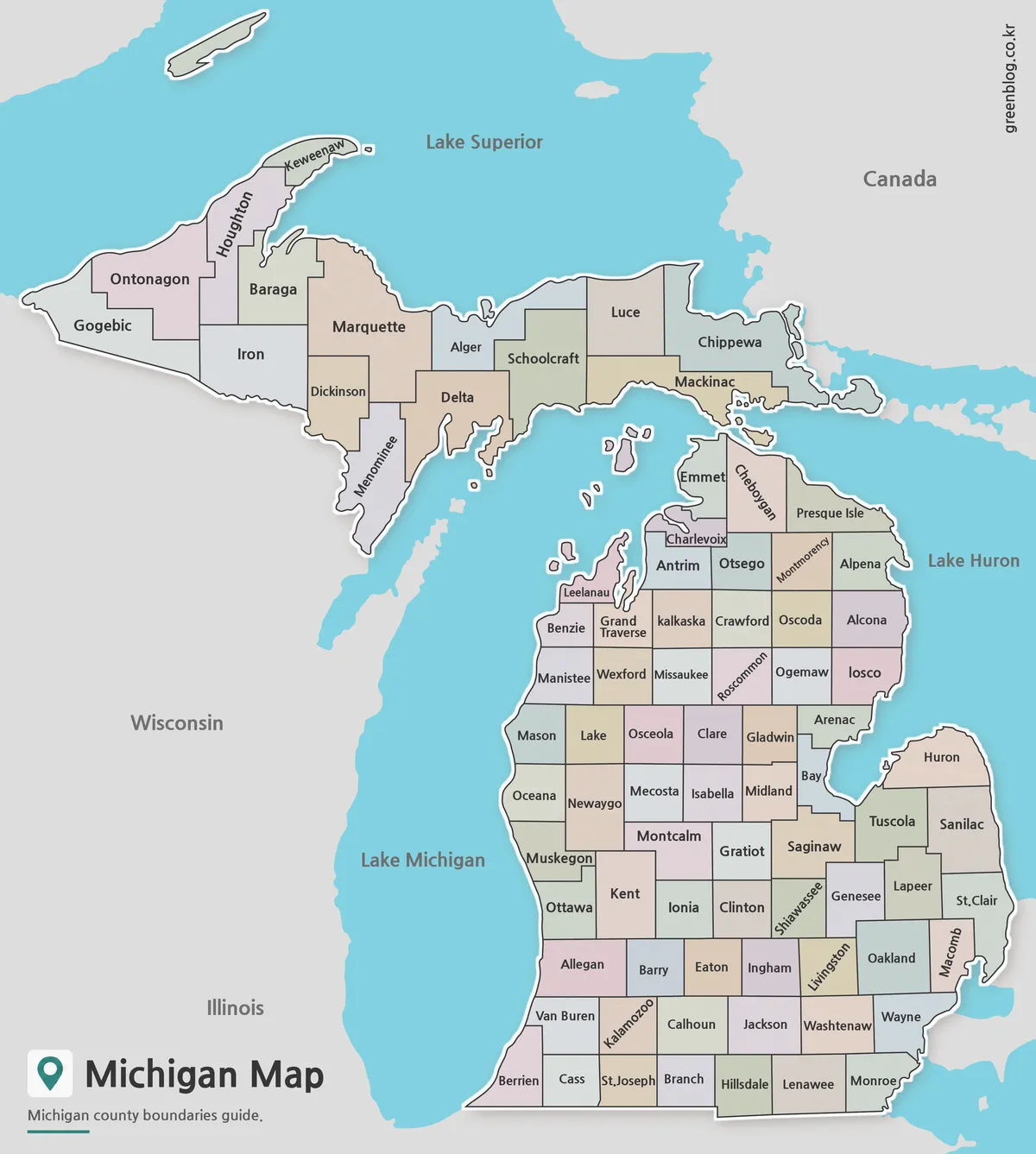
The pastel fills distinguish neighboring counties without suggesting that the colors represent data. In the Upper Peninsula, the palette helps separate wide counties such as Marquette and Schoolcraft from narrower or irregular units such as Houghton, Keweenaw, Menominee, and Mackinac. The islands remain visible against the blue water, which is important because a purely rectangular county grid would not explain Michigan’s geography.
On the Lower Peninsula, the color Michigan Map makes the transition from northern shoreline counties to the more regular interior rows easy to follow. Emmet, Cheboygan, and Presque Isle define much of the northern edge, while Leelanau and Grand Traverse face the west. Farther south, the pastel blocks separate compact southeastern names such as Oakland, Macomb, Wayne, Washtenaw, and Monroe without adding city symbols.
This version is the strongest choice for a screen presentation or introductory lesson. A teacher can ask students to trace the Lake Michigan side, compare the two peninsulas, or locate a county before switching to the blank worksheet. Since the colors are decorative categories only, a presenter adding new statistics should replace them with a deliberate scale or add an unmistakable legend.
Labeled Version for Printing
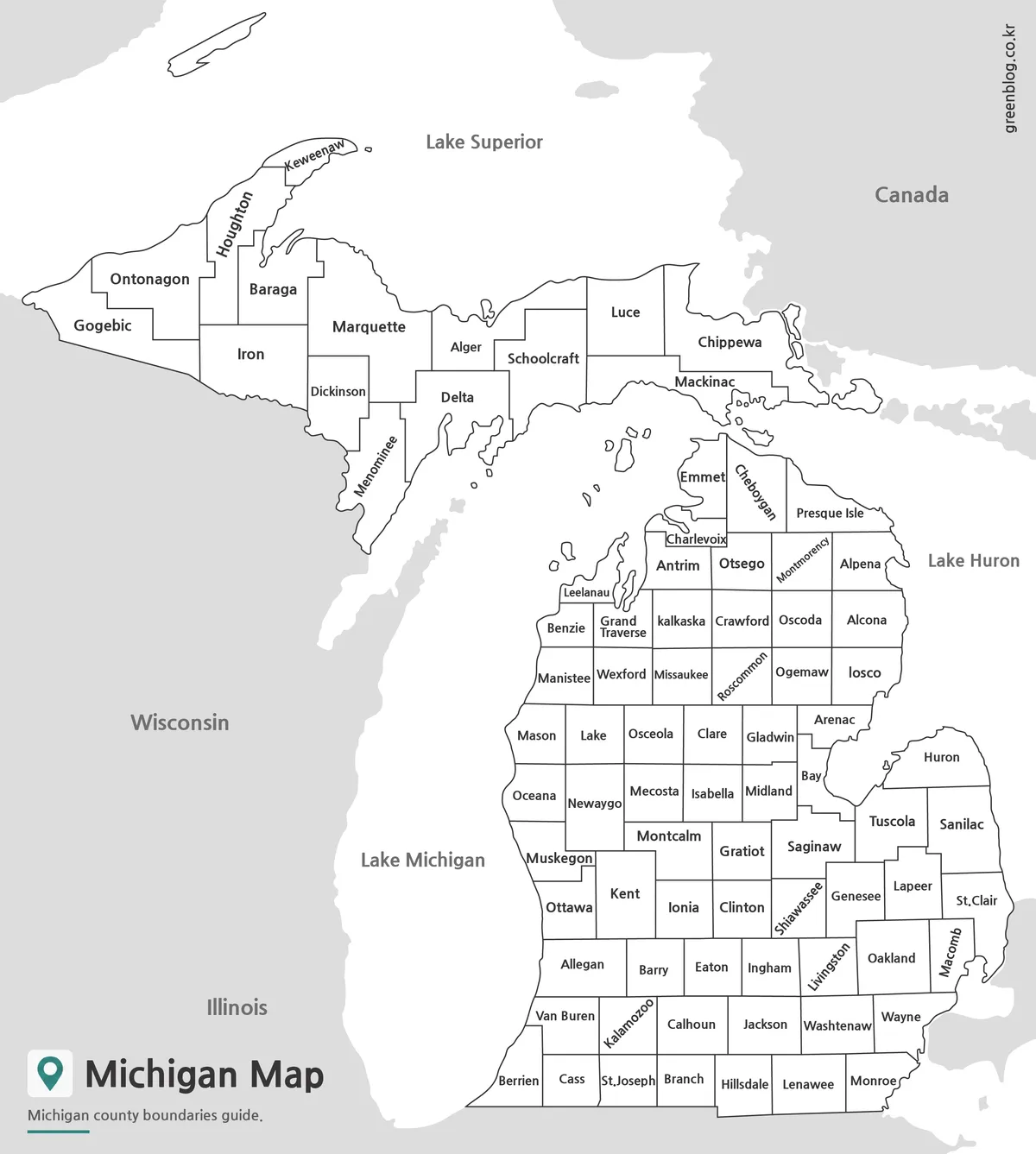
The monochrome version removes the pastel fill but retains county names, lake names, and selected surrounding labels. Its open white areas fit naturally into reports and photocopied handouts. They also leave room for circles, arrows, or a few short notes while preserving the county-name reference underneath.
A labeled Michigan Map is particularly helpful where names share a directional or geographic relationship. Students can distinguish Grand Traverse from nearby Leelanau and Kalkaska, compare St. Clair with neighboring Macomb, or find the southern row from Berrien through Monroe. In the Upper Peninsula, the map shows Keweenaw at the end of the long northern projection and identifies Isle Royale as a separate island shape farther northwest, though the island itself is not labeled.
Keep the original portrait aspect ratio when printing. Reducing a 1200×1337 preview far below its A3-oriented layout may make rotated or compact names—such as Houghton, Menominee, Montmorency, Roscommon, Shiawassee, and Kalamazoo—harder to read. A test page is sensible if a printer automatically crops to fill or adds unusually wide margins.
Blank Outline Map for Editing Projects
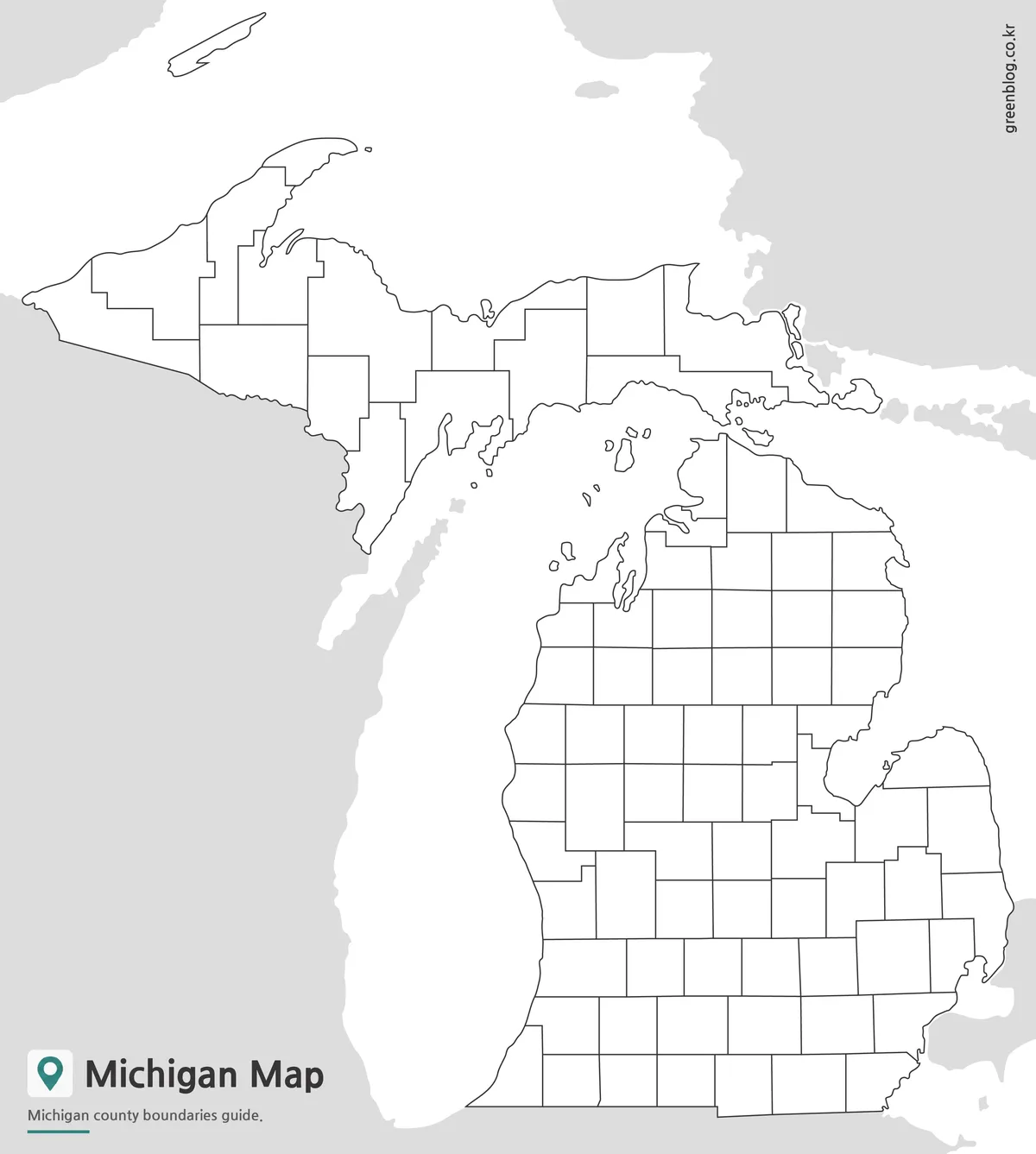
The blank outline removes county names, lake labels, and surrounding-place labels while keeping the state silhouette and internal divisions. It works as a labeling exercise, a coloring activity, or a base for a small number of sourced categories. Because the file is an image, it should not be described as a vector map or an editable source with individually selectable counties.
A blank Michigan Map can be divided into manageable learning tasks. One worksheet might focus on the 15 Upper Peninsula counties, another on the northern Lower Peninsula, and a third on the regular southern rows. Learners can also mark which counties touch a Great Lake shoreline, identify the island portions, or label the counties along the Wisconsin land boundary without needing city or road information.
For thematic projects, retain an untouched master copy before adding fills or text. Give every added symbol a legend and identify the year and source of the data, especially for election, population, environmental, or economic subjects. The outline establishes county location only; it does not verify a modern route, municipal boundary, park, water feature, or statistical value.
Why a Michigan Map Can Be Helpful
Michigan’s two-part form makes simple directional descriptions less effective than they are for a compact state. A county that appears far north in the Lower Peninsula may still lie south of much of the Upper Peninsula, and water separates areas that look close on a national map. Seeing both landmasses at a consistent scale helps readers understand these relationships without assuming a continuous land connection.
For classroom work, use the color edition as the introduction, the monochrome edition as an answer key, and the blank edition for recall. For a presentation, the Michigan Map can support county location and Great Lakes orientation while a separate chart carries the actual statistics. This separation keeps the map readable and prevents decorative colors from being mistaken for quantitative information.
The set is also useful for cross-state comparison. The visible Wisconsin label clarifies the Upper Peninsula’s land connection, while Canada is placed beyond the water to the northeast and east. Illinois appears west of the Lower Peninsula across Lake Michigan. These labels provide broad context, but users should consult a broader regional map when they need every interstate or international boundary explained.
Frequently Asked Questions
Can I print the Michigan Map in A3 size?
Yes. All versions were prepared for high-resolution A3 printing.
Which file formats are included?
The collection includes JPG, PNG, and ZIP files.
Is the outline version editable
Yes. The outline map is suitable for graphic editing, annotations, educational activities, and infographic creation.
Does the map include county boundaries?
Yes. All versions include county boundary information, although the amount of labeling varies by version.
Map File Information
Download the color labeled, black-and-white labeled, and blank county-boundary maps for A3 printing, lessons, reference, or annotation.
- Included Versions: Color county, black-and-white labeled, and blank outline maps
- Printable Size: A3 High Resolution
- File Type: JPG / PNG / ZIP
- Intended Use: County reference, worksheets, slides, and custom notes
Related Maps
Additional Resources
- State of Michigan Counties – Review the official county map, alphabetical county list, and links to county government services.
Green Map creates custom-edited map images using open geographic data sources such as geoBoundaries, Natural Earth, OpenStreetMap, and government open data.
These maps are edited visual materials, not raw data files, and are provided for education, documents, presentations, and graphic reference.