A Nara Prefecture map has to present two very different administrative patterns on one page. Small municipalities cluster tightly across the northern basin, while much larger cities, towns, and villages extend through the mountainous south. A clear layout must keep both the crowded northern names and the broad southern boundaries readable without changing their geographic relationship.
This collection supplies three JPG images prepared for an A3 layout: a pastel color administrative map, a labeled black-and-white map, and an unlabeled outline. The color and monochrome versions identify municipalities, while the outline retains the same boundary network as an open base for exercises and custom annotations. Roads, railways, terrain shading, tourist sites, and route lines are not included.
The Nara Prefecture map covers all 39 municipalities—12 cities, 15 towns, and 12 villages. Four compact northern towns are referenced by numbers and explained in an inset, preventing their names from colliding with nearby boundaries. This treatment makes the set useful for prefectural geography lessons, municipality comparison, slide graphics, labeling activities, and regional information projects.
Table of Contents
Nara Prefecture Map Overview
Nara is a landlocked prefecture in the Kansai region of Honshu. It meets Kyoto Prefecture to the north, Osaka Prefecture to the west, Wakayama Prefecture to the west and south, and Mie Prefecture to the east. The supplied labeled maps show Osaka, Wakayama, and Mie as surrounding references, while the main focus remains entirely on Nara’s internal municipal pattern.
The northern part contains Nara City and a dense group of municipalities such as Ikoma, Yamatokoriyama, Tenri, Kashihara, Sakurai, Kashiba, and neighboring towns. Within this compact area, Kawanishi Town, Kanmaki, Ando, and Miyake are assigned the numbers 1 through 4 and named in a separate box. The inset is a practical response to label density rather than an additional map layer.
Farther south, administrative areas become visibly larger. Gojo occupies a broad southwestern section, and villages such as Tenkawa, Kawakami, Kamikitayama, Shimokitayama, Nosegawa, and Totsukawa spread across the lower half. The contrast between many small northern units and fewer expansive southern units is one of the defining features readers can learn from this map.
The images identify municipal boundaries, not districts within cities or individual neighborhoods. Nara City appears as one municipality, just as each town and village appears as one unit. That distinction matters when the map is used beside travel, demographic, educational, or administrative material gathered from another source.
Color Administrative Map
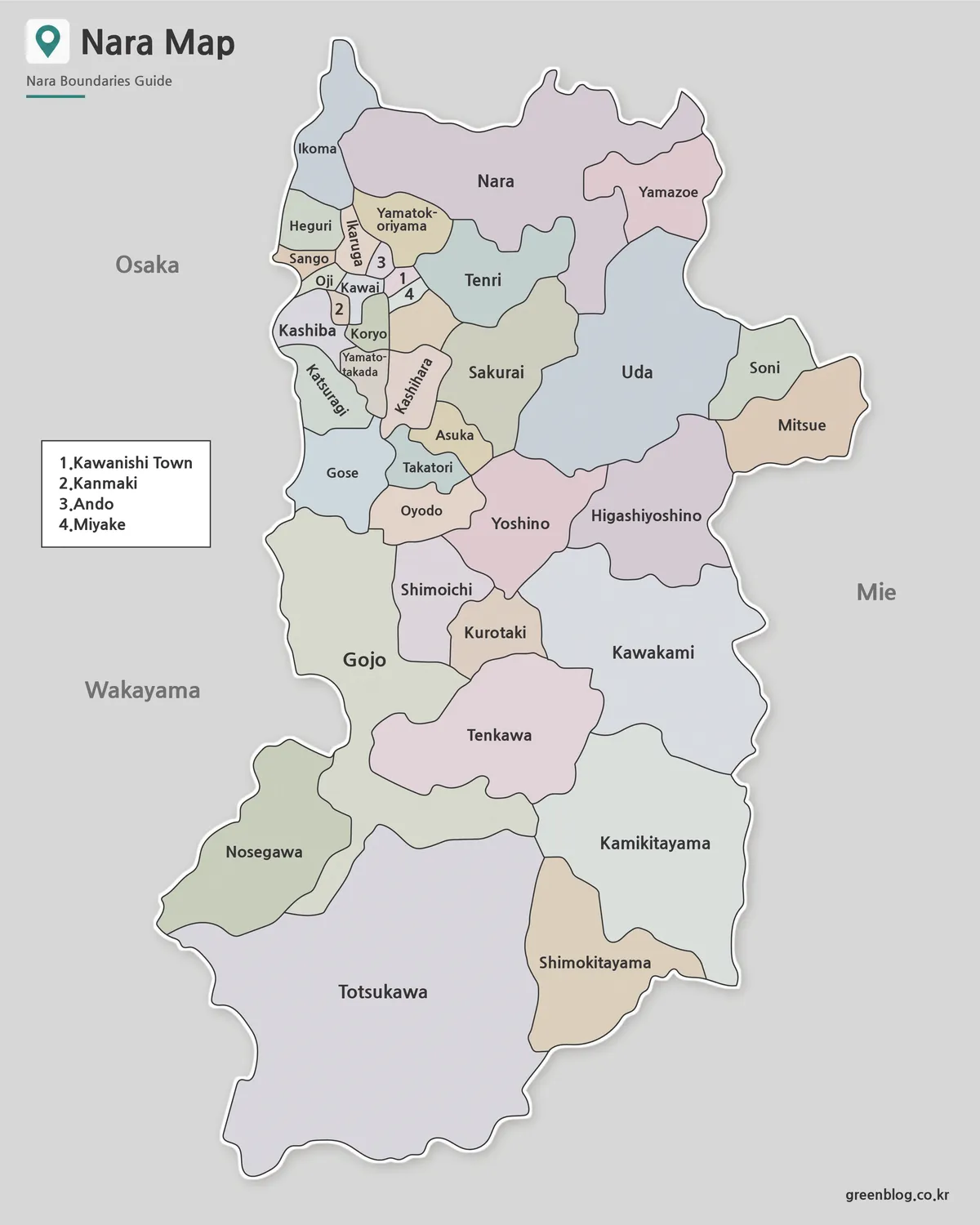
Soft contrasting fills separate adjacent municipalities without assigning a statistical meaning to the colors. This is most valuable around Oji, Kawai, Koryo, Yamatotakada, Kashihara, and the numbered inset area, where many borders meet in a small space. In the south, color helps a reader distinguish large neighboring shapes such as Totsukawa, Kamikitayama, Shimokitayama, and Kawakami at a glance.
Choose the color Nara Prefecture map for projected lessons, introductory slides, or regional comparison graphics. A presenter can contrast the dense northern basin with the broad southern mountain municipalities while retaining every supplied name. Any later use of color for population, tourism, land use, or another subject requires a separate legend, because the original pastel palette carries no data value.
The gray surrounding field keeps the prefectural outline distinct and leaves room for the neighboring-prefecture labels and four-item inset. This spacing is part of the composition, so cropping the left side could remove both geographic context and the key for the numbered towns.
Black and White Printable Map
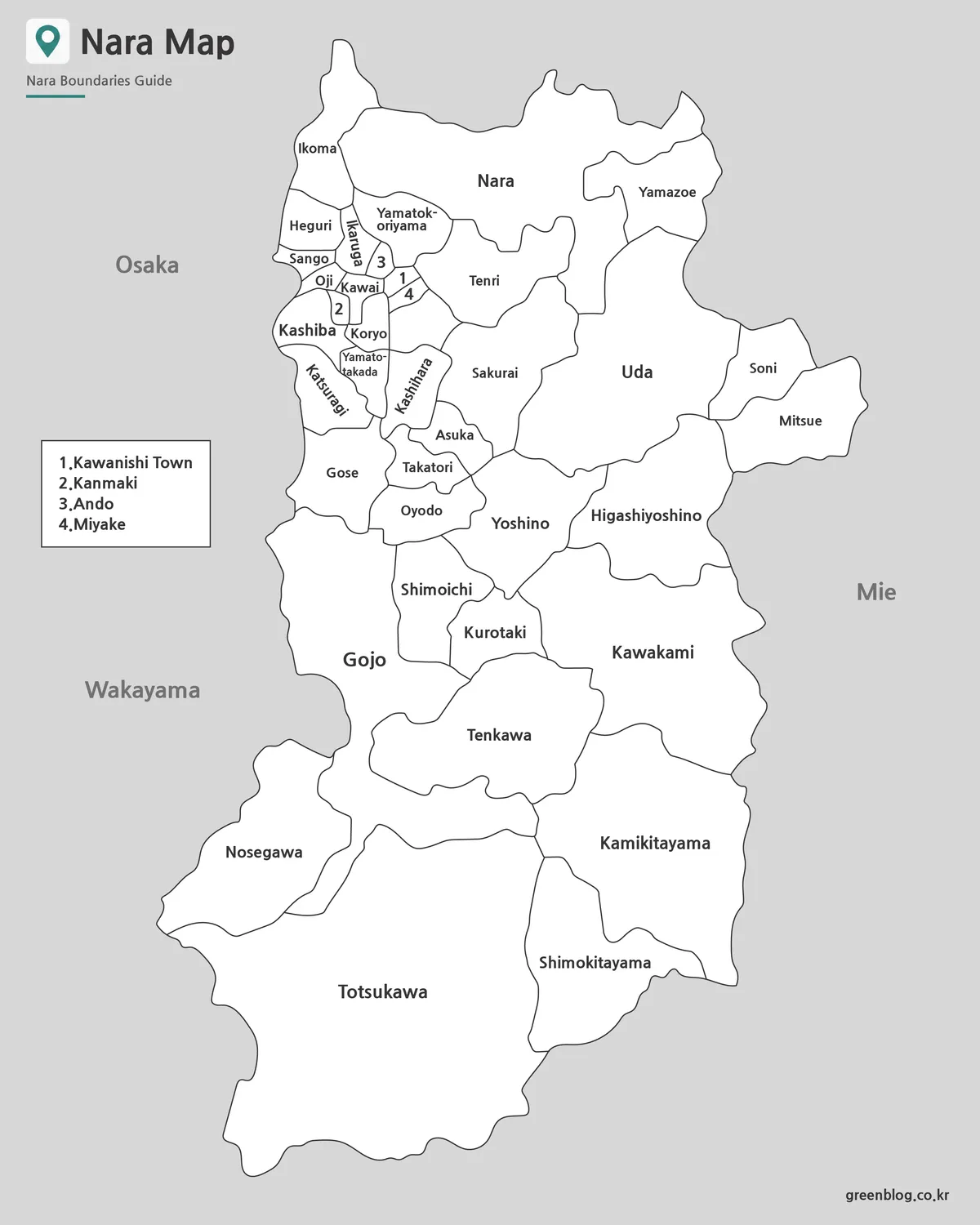
The monochrome edition preserves municipality names, numbers, boundary lines, and neighboring-prefecture labels while removing the pastel fills. It fits reports, worksheets, course packets, and presentation pages that need a neutral appearance. Readers rely on linework and labels rather than color, so the administrative information remains available in grayscale.
This Nara Prefecture map is the clearest choice when students need a labeled reference during an exercise. It can sit beside a blank copy, support a municipality-location quiz, or accompany a table in which the 39 municipalities are grouped as cities, towns, and villages. It should not be treated as a transport guide because no stations, highways, or travel times appear.
When reducing the A3 layout to a smaller sheet, use proportional scaling and inspect the northern names before printing multiple copies. The numbered towns are already compact, and additional reduction may make the inset harder to read. Avoid cropping the gray margin simply to enlarge the central shape, since the surrounding labels and key are part of the reference design.
Blank Outline Map for Editing
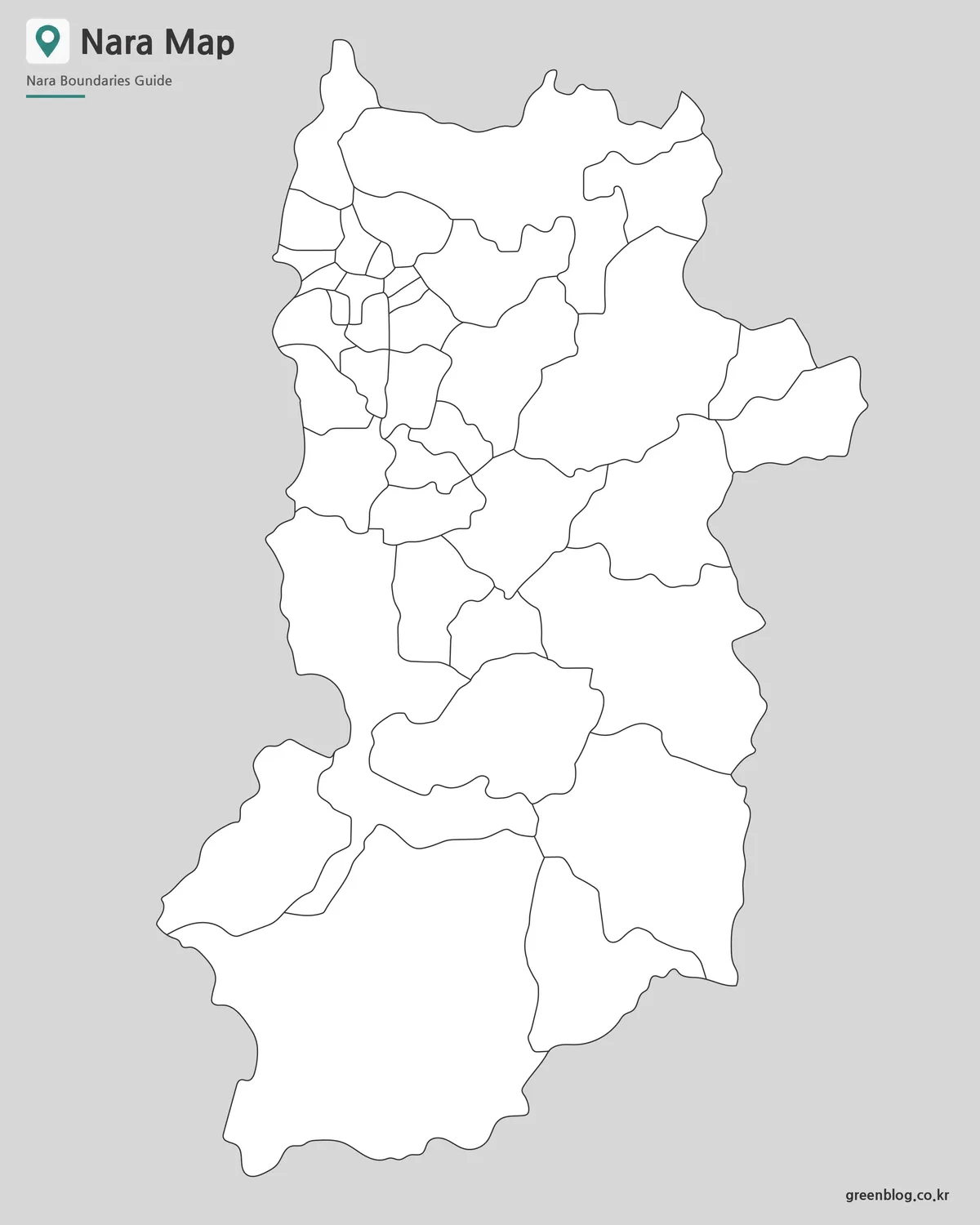
The outline removes municipality names, numbers, the inset text, colors, and neighboring-prefecture labels. What remains is the full outer silhouette and the internal municipal boundary network. The open white areas can receive custom labels, category fills, location markers, or classroom answers without competing with printed text.
A teacher could ask students to identify Nara City, locate the four small towns represented by numbers in the labeled maps, or distinguish the large southern villages from the northern cluster. A designer could use a copy to add sourced statistics or highlight a custom study region. Routes and tourist sites may also be drawn, but they are user-created additions rather than features supplied in the file.
The download is confirmed as a JPG image rather than an SVG or editable vector source. Editing therefore means placing marks, text, or fills over the raster image in a graphics program, slide editor, or document application. Retain an untouched copy and avoid enlarging far beyond the intended A3 layout when clean line edges are required.
Built for Printing and Presentation Use
The tall page orientation gives Nara’s north-to-south form enough room while preserving the difference in municipal scale. At the top, labels and the inset manage crowding; farther down, large areas such as Totsukawa can fill the page without forcing the northern municipalities into an unreadably small corner. That balance is more important here than maximizing the outer silhouette alone.
- Quick visual comparison: use the color map to separate neighboring municipalities.
- Labeled study sheet: use the monochrome edition when names must remain visible.
- Recall or annotation: use the outline when the reader will add information.
- Document preparation: scale proportionally and check the northern inset before printing.
For a classroom sequence, introduce the Nara Prefecture map in color, provide the black-and-white version for guided reference, and finish with the blank outline. In a presentation, the same progression can move from orientation to analysis. Consistent geometry across the three files lets the audience compare versions without relearning the administrative arrangement.
Why This Map Is Useful
Nara is often introduced through Nara City, but the prefecture extends far beyond the capital. Yoshino, Tenkawa, Kawakami, Kamikitayama, Shimokitayama, Nosegawa, and Totsukawa occupy substantial southern areas, while many cities and towns are concentrated closer to Osaka and Kyoto. The map makes that prefectural scale visible.
A well-organized Nara Prefecture map also prevents a common reading problem: assuming that every large shape represents a city or that every small shape is less important. The image depicts three municipal types within one boundary system. When time-sensitive data is added, the source and reference year should be stated separately so the stable base map is not confused with a current statistical claim.
Frequently Asked Questions
Can I print the Nara Prefecture map?
Yes. The JPG files are designed for A3 high-resolution printing.
Which version is best for classroom use?
The black and white labeled map works well for handouts, while the outline map is better for worksheets.
Can I edit the outline map?
Yes. The blank outline version is suitable for adding labels, routes, colors, or custom data.
Does the map include municipal boundaries?
Yes. The Nara Prefecture map set includes administrative boundary lines.
Why does the Nara Prefecture map use numbers for four towns?
Kawanishi Town, Kanmaki, Ando, and Miyake occupy a compact northern area where full labels would compete for space. The labeled maps use numbers 1 through 4 and identify them in a separate inset. The outline omits both the numbers and the inset text.
Map File Information
The archive provides three Nara municipal maps for color reference, monochrome printing, and blank annotation.
- Included Versions: Color labeled · black-and-white labeled · blank outline
- Printable Size: A3 high resolution
- File Type: JPG
- Intended Use: Municipal reference · classroom activities · presentations · annotation
Related Maps
- Okinawa Prefecture Map
- Nagasaki Prefecture Map
- Gifu Prefecture Map
- High-Resolution Aomori Prefecture Map
- Nagano Prefecture Map
Additional Resources
- Nara Prefecture Municipalities: Consult the prefectural government’s official list of Nara’s cities, towns, and villages.
Green Map creates custom-edited map images using open geographic data sources such as geoBoundaries, Natural Earth, OpenStreetMap, and government open data.
These maps are edited visual materials, not raw data files, and are provided for education, documents, presentations, and graphic reference.