A Uruguay Map can show more than the country’s compact outline at the southeastern edge of South America. Uruguay is positioned between Argentina and Brazil, with the Río de la Plata along much of its southern and southwestern side and the Atlantic Ocean on the east. Inside that outline, 19 departments form a balanced but varied administrative pattern, from broad northern areas to the small capital department on the southern shore.
This collection contains three confirmed images: a color administrative map, a labeled black-and-white map, and a blank departmental outline. Each uses the same A3 landscape composition, keeping Uruguay large while retaining simplified portions of Argentina, Brazil, surrounding water, and coastal features. The shared layout makes it easy to move between a finished visual reference, a monochrome handout, and an annotation base.
The labeled maps identify all 19 departments. Montevideo is written just below its very small department, while Argentina, Brazil, and the Atlantic Ocean provide regional context. Roads, city networks, terrain, tourism sites, and detailed navigation information are not included, so the set is best understood as a department-level reference for printing, education, presentations, and raster-based design.
Table of Contents
A Compact Country with 19 Departments
Uruguay’s departments create several clear geographic bands. Artigas occupies the far north, with Salto and Paysandú continuing down the western side. Rivera and Cerro Largo meet Brazil in the north and northeast, while Rocha and Maldonado reach the southeastern coast. Central departments such as Tacuarembó, Durazno, Flores, Florida, and Lavalleja connect these outer areas.
A Uruguay Map is particularly helpful in the south, where administrative units become smaller and the coastline changes direction. Colonia and San José face the Río de la Plata, Canelones wraps around much of the capital department’s inland side, and Montevideo occupies a narrow area on the southern shore. The map places the Montevideo label outside that small polygon so it remains readable rather than crowding nearby lines.
A prominent branching water shape also appears in the interior, crossing the central-western part of the country. It is visible in all three versions but is not named, so readers should not use this administrative set as a complete hydrographic reference. The feature nevertheless helps orient the boundary relationships around Río Negro, Tacuarembó, Durazno, Flores, and Soriano.
Coastline Context on the Uruguay Map
The country’s southern and eastern water edges should not be described as one continuous Atlantic coastline. Much of the southern shore, including Montevideo, faces the Río de la Plata, while the open Atlantic coast lies farther east. The supplied maps label the “Atlantic Ocean” but do not separately label the Río de la Plata, an important limitation when using the image for geographic instruction.
Argentina appears in gray to the west, and Brazil appears in gray to the north and northeast. These neighboring areas are intentionally simplified and do not show their internal administrative divisions. The arrangement keeps Uruguay central while explaining why western departments relate to Argentina and northern or northeastern departments relate to Brazil.
The eastern side includes lagoons, coastal water shapes, and a narrow strip of surrounding land detail. These forms add visual context near Rocha without turning the page into a physical or nautical map. Anyone teaching rivers, estuaries, lagoons, or coastal systems should pair this collection with a specialized source that identifies those features by name.
Three Map Styles for Different Tasks
Several department names in the artwork omit Spanish accent marks. For example, “Paysandu,” “Rio Negro,” “Tacuarembo,” and “San Jose” appear on the image, while standard Spanish spellings are Paysandú, Río Negro, Tacuarembó, and San José. The article and metadata use the standard forms even though the original map labels remain unchanged.
Color Administrative Map
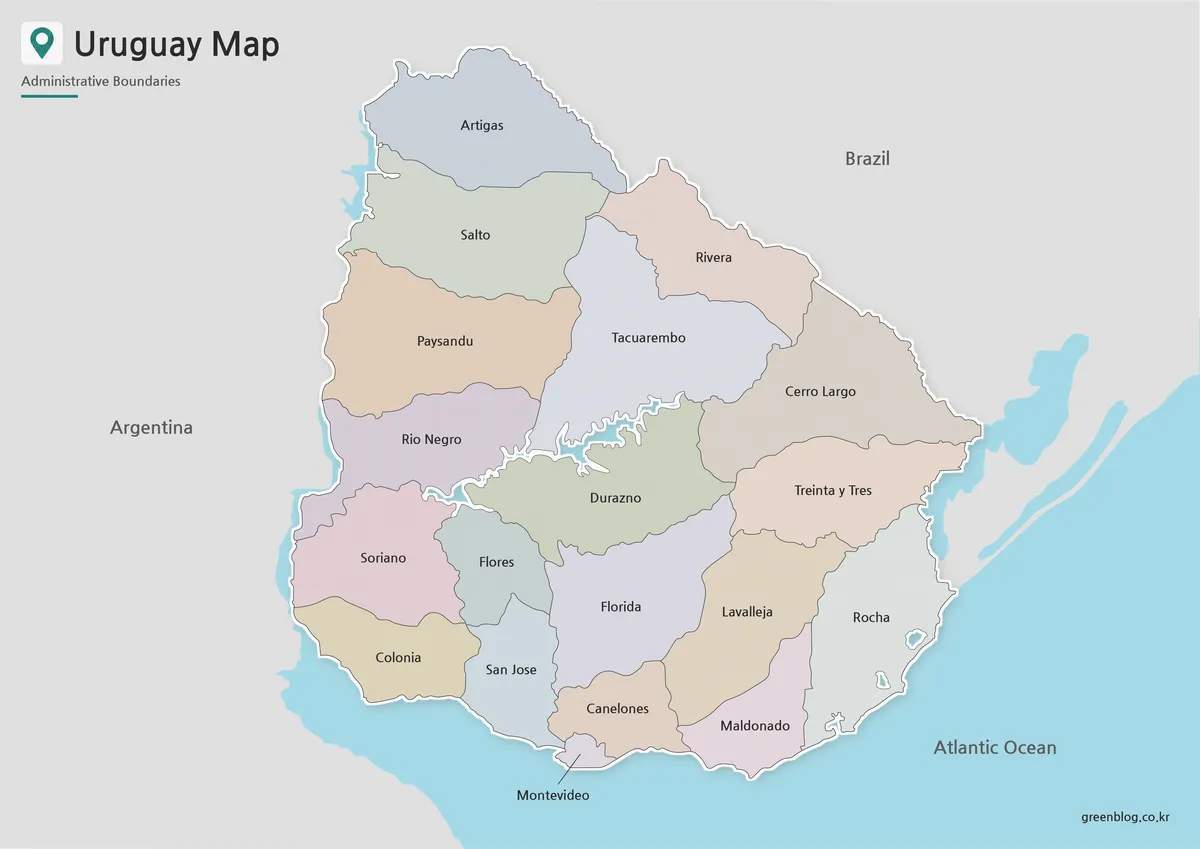
Muted fills give each department a separate visual identity. Color is especially effective around the south, where Colonia, San José, Canelones, Montevideo, Maldonado, and neighboring departments occupy smaller spaces than the broad northern units. The palette remains light enough for black labels and fine boundary lines to stay visible.
Choose the color Uruguay Map for presentation slides, online country profiles, classroom displays, and graphics where departments must be distinguished immediately. Uruguay is outlined with a pale edge and subtle shadow, while Argentina and Brazil remain gray. Blue water areas make the coastline and the branching interior water feature more noticeable without adding a separate legend.
The map does not use a star or dot for the capital. Instead, Montevideo is identified by its department name placed beneath the small southern polygon. Presenters discussing the city should avoid implying that the label marks a precise point within the department.
Labeled Black-and-White Map
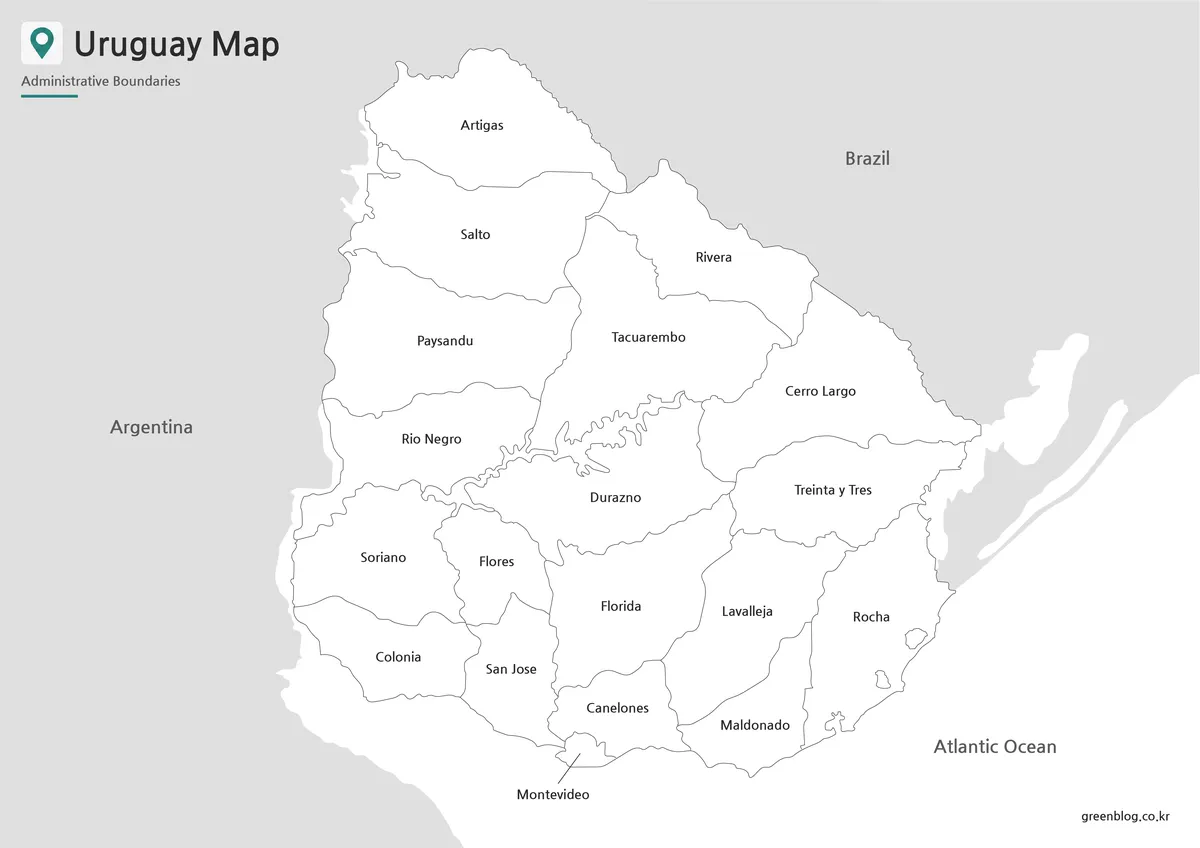
The monochrome version removes departmental fills but retains all 19 names, neighboring-country labels, the ocean label, and the same boundary structure. White interiors create a quieter reference for printed reports, classroom handouts, and study sheets. They also leave room for notes or numbering without competing against a colored background.
On this Uruguay Map, linework carries most of the geographic information. Students can follow the western sequence from Artigas to Salto, Paysandú, Río Negro, Soriano, and Colonia, or compare the Brazilian border departments with those along the southern shore. The file can also serve as an answer key for a department-naming or coloring activity based on the blank outline.
Blank Departmental Outline
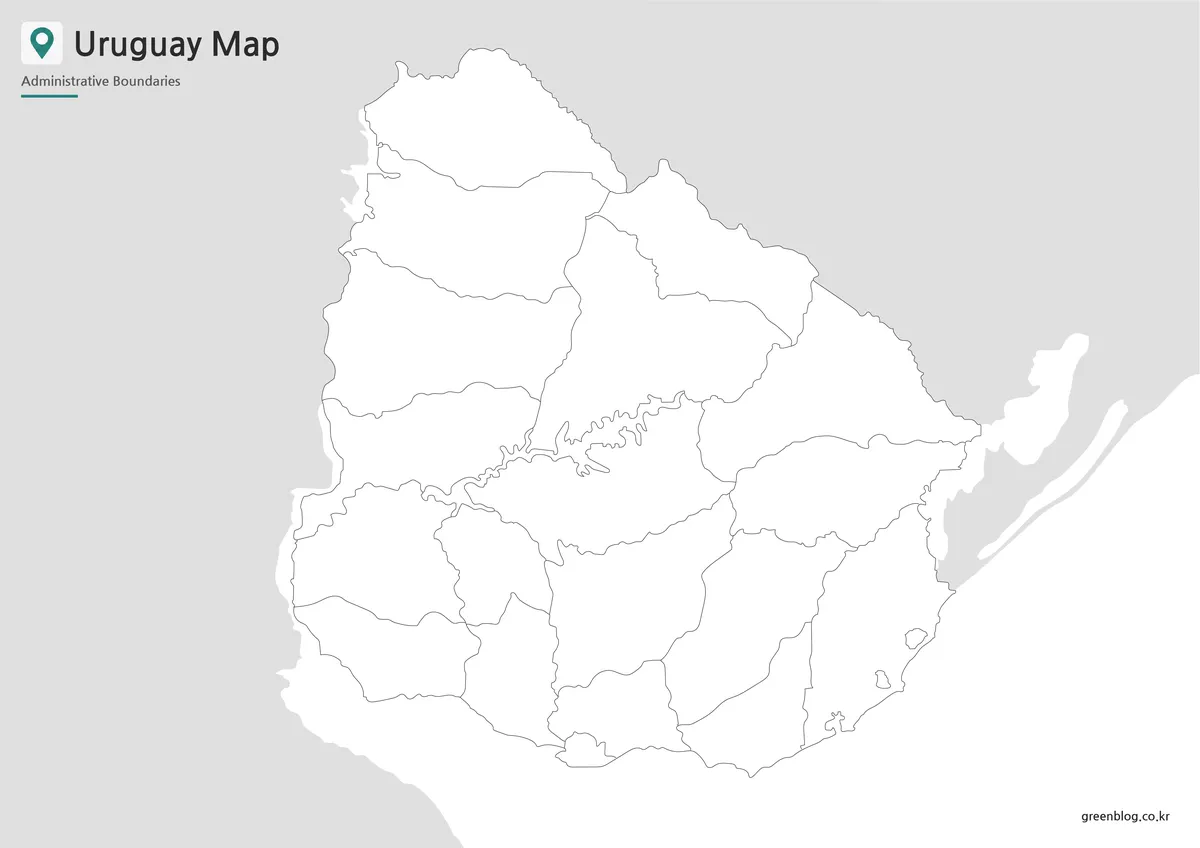
The outline map removes department names, country labels, the ocean label, and color fills. It keeps Uruguay’s outer boundary, all internal department lines, visible water shapes, and simplified surrounding land. This makes it the least prescriptive version and the easiest one to adapt for different languages or visual themes.
A blank Uruguay Map can become a department-labeling quiz, a regional coloring exercise, or a base for adding a sourced dataset. Teachers might ask learners to identify the departments bordering Argentina or Brazil, locate Montevideo, or separate Río de la Plata-facing departments from Atlantic-facing ones. Designers can add routes, statistics, icons, or category colors in presentation and raster-editing software.
The supplied image is not confirmed as an editable vector source. Its boundaries may therefore not behave as independent paths or selectable shapes. Users should treat it as a high-resolution raster base unless the download archive separately confirms another format.
Choosing the Appropriate Version
Use the color file when speed of recognition matters most. It provides a ready-made visual hierarchy for slides, posters, and blog illustrations. Select the labeled black-and-white file when names must remain available but the surrounding document needs a restrained appearance or will be reproduced without color.
The outline version is better when the reader is expected to contribute information. Pairing it with the labeled Uruguay Map creates a matching exercise and reference set. It can also support custom infographics, provided any added statistics or thematic classifications are dated and sourced separately.
Printing, Teaching, and Presentation Ideas
The A3 landscape layout provides enough room to show the full country and maintain the small Montevideo department. When reducing the image to A4, letter size, or a narrow web column, check southern labels such as Montevideo, Canelones, and San José before publishing. Excessive cropping may also remove Argentina, Brazil, or the coastal context that explains Uruguay’s continental position.
In a classroom, students can first label all 19 departments on the outline version. A second task can group them by international border or water-facing position. This approach develops map-reading skills without incorrectly treating administrative boundaries as physical regions.
Scope and Interpretation Limits
The internal lines represent departments rather than municipalities, cities, tourism zones, or watersheds. Montevideo is both the national capital and one of the 19 departments, but the image does not distinguish the city boundary from the department through a separate symbol. Likewise, the surrounding countries are only contextual silhouettes.
The Uruguay Map collection is most reliable as a printable administrative overview and customizable visual base. Users adding population, transport, tourism, economic, or environmental information should identify its source and reference date. Keeping the original boundaries separate from added data makes later corrections and updates much easier.
Frequently Asked Questions
How many departments appear on the maps?
All 19 departments are shown: Artigas, Canelones, Cerro Largo, Colonia, Durazno, Flores, Florida, Lavalleja, Maldonado, Montevideo, Paysandú, Río Negro, Rivera, Rocha, Salto, San José, Soriano, Tacuarembó, and Treinta y Tres. Municipal boundaries are not included.
Why is Montevideo labeled outside its department?
Montevideo Department occupies a small area on Uruguay’s southern shore. Placing its name immediately below the polygon keeps the text readable and prevents interference with nearby boundaries. The label identifies the department and capital generally; it is not a precise point marker for the city center.
Which Uruguay Map is best for a worksheet?
Use the blank outline when students need to write department names, add colors, or classify border and coastal areas. The labeled black-and-white version makes a suitable answer key because it preserves all department names and neighboring-country context without relying on color.
Does the map distinguish the Río de la Plata from the Atlantic Ocean?
Not completely. The artwork labels the Atlantic Ocean but does not separately name the Río de la Plata along Uruguay’s southern and southwestern shore. Readers studying the coastline should remember that Montevideo faces the Río de la Plata, while the open Atlantic coast lies farther east.
Can the outline version be edited?
The blank Uruguay Map can be annotated with text, arrows, icons, routes, and color overlays in presentation or raster-editing software. No editable vector file is confirmed, however. Do not assume that every department is supplied as an independent selectable shape.
Map File Information
This download includes printable Uruguay map versions for educational use, presentation design, document printing, and editable graphic projects.
- Included Versions: Color map, black and white map, outline map
- Printable Size: A3 layout
- File Type: Image files
- Intended Use: Classroom handouts, presentations, blog graphics, infographic editing, and printable reference materials
Related Maps
- Ecuador Map Download for Printing, Classroom Use, and Graphic Editing
- Costa Rica Map Download: Printable Color, Black-and-White and Outline Maps
- Printable Bolivia Map Set: High-Resolution Maps for Education and Design
- Printable Paraguay Map Collection for Education and Design Projects
Additional Resources
- Visit Uruguay: Uruguay’s official country website explains destinations along both the Atlantic Ocean and Río de la Plata, helping readers distinguish the two coastal settings.
Green Map creates custom-edited map images using open geographic data sources such as geoBoundaries, Natural Earth, OpenStreetMap, and government open data.
These maps are edited visual materials, not raw data files, and are provided for education, documents, presentations, and graphic reference.